
How to add meta tags programmatically in Drupal 7

This is the article number 10 of the series Practical Drupal Development. In this article, I'm going to show you how to add meta tags in Drupal 7 by using renderable arrays and the drupal_add_html_head() function.
The Goal
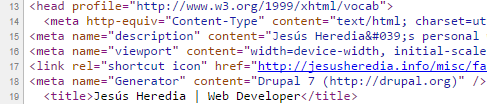
In the previous article, you customized the title of the front page by using preprocess functions. In this article, you are going to add a description to the front page by using renderable arrays, the drupal_add_html_head() function, and, of course, the same preprocess function as you used to customize the title.
Renderable Arrays
In Drupal 7 the whole page is built on renderable arrays, meaning that they are used to store the output to be rendered into HTML by the drupal_render() function.
Arrays are variables that allow you to store multiple values (non-scalar variables). PHP supports two types of these variables: arrays and objects.
This is what the function looks like:
/**
 * [THEME] Preprocess function for the html theme hook.
 */
function themename_preprocess_html(&$variables) {

  $front_page = drupal_is_front_page();

  if ($front_page) {

    $variables['head_title'] = 'Jesús Heredia | Web Developer';

    // Add the description meta tag to the header
    $meta_description = array(

      '#type' => 'html_tag',

      '#tag' => 'meta',

      '#attributes' => array(

        'name' => 'description',

        'content' => "Jesús Heredia's personal website. Web Development on HTML5, CSS3, JavaScript, PHP, and Drupal.",

      )

    );

    drupal_add_html_head($meta_description, 'meta_description');

  }

}
The first parameter of the drupal_add_html_head() function must be a renderable array. If the #type key is not set, then html_tag will be added as the default #type.